Orchestrator
What it is
The Orchestrator is the primary jobs workspace in JobOps.
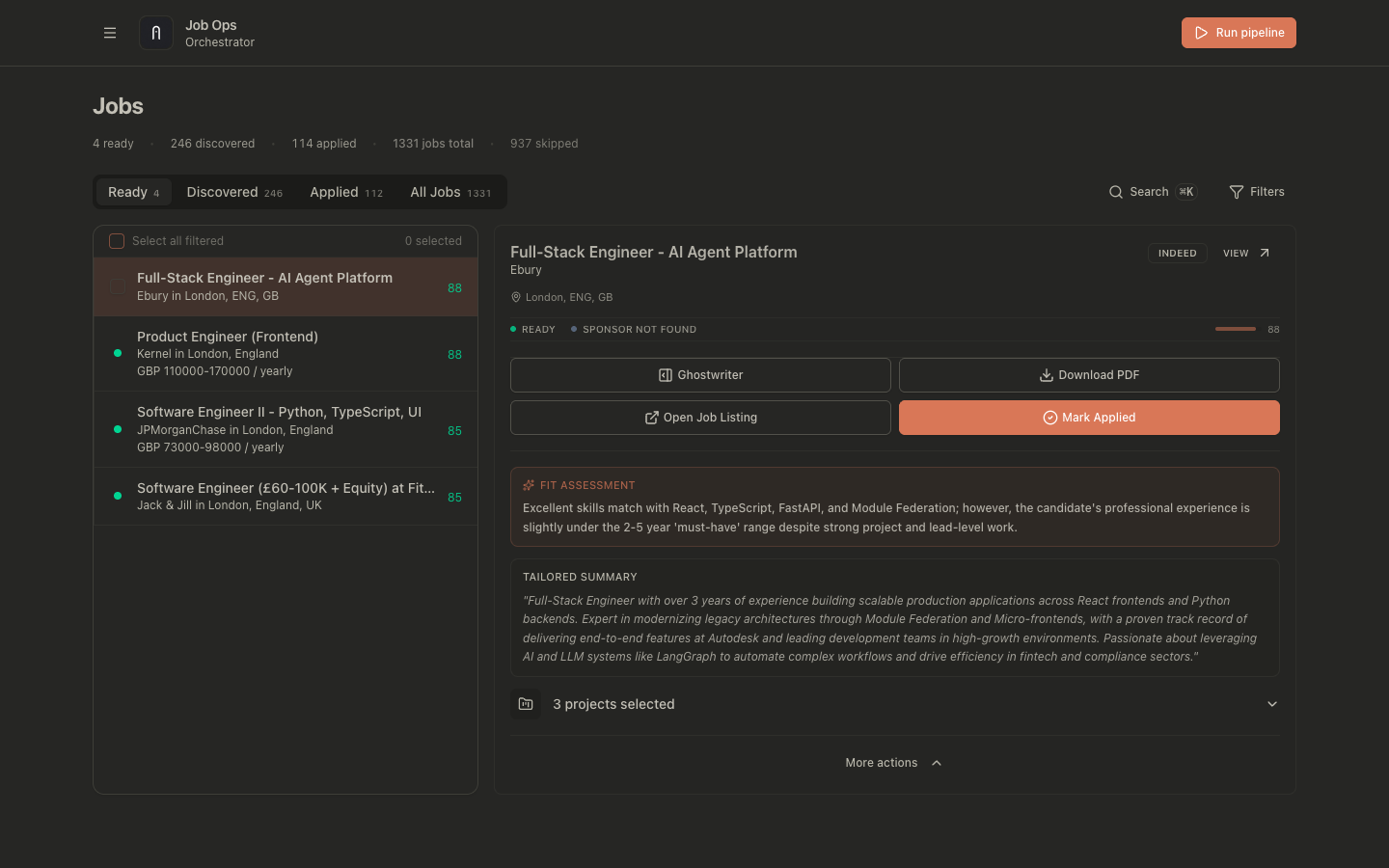
It controls:
- job lifecycle states
- manual and automatic ready flow
- PDF generation and regeneration
- job-level titled markdown notes on the dedicated job page
- handoff to post-application tracking
Job states:
discovered: found by crawler/import, not tailored yetprocessing: tailoring and/or PDF generation in progressready: tailored PDF generated and ready to applyapplied: marked as appliedskipped: explicitly excluded from active queueexpired: deadline passed
Why it exists
Orchestrator centralizes the transition from discovered opportunities to application-ready artifacts.
It exists to ensure:
- a consistent path from discovery to tailored output
- clear status transitions across manual and automated workflows
- predictable regeneration behavior when job data changes
- a place to keep application-specific answers, interview contacts, and general reminders close to the job
- visibility when a reposted role looks like a job you already applied to, even if the URL changed
- faster external research from the Ready tab with prebuilt search links for LinkedIn, GitHub, and broader web results
- one place to filter and sort jobs across every orchestrator tab
How to use it
Intended ready flow
- Manual flow:
- Job starts in
discovered. - Open the job and choose Tailor.
- Edit JD/tailored fields/project picks.
- Click Finalize & Move to Ready.
- Job starts in
- Auto flow:
- Pipeline scores discovered jobs.
- Top jobs above threshold are auto-processed.
- Jobs move directly to
readywith generated PDFs.
Using the Filters panel
The main jobs page has a Filters button on the top-right next to Search.
Use it when you need to narrow the current tab without changing tabs.
What the panel includes:
- source filters
- sponsor status filters
- salary filters
- date filters
- sorting controls
Job rows and the detail header can also show a Previously Applied warning when JobOps finds a high-confidence fuzzy match against one of your past applied or in-progress jobs using title and company, not just URL dedupe. To avoid flagging genuinely new openings, JobOps only shows this warning when the matched historical application falls within 30 days of the current job's discovery date.
Date filters work on every jobs tab:
ReadyDiscoveredAppliedAll Jobs
Available date dimensions:
ReadyAppliedClosedDiscovered
Each selected date dimension uses the same range:
- quick presets:
7,14,30,90days - custom
Start dateandEnd date
Jobs match when they fit the current tab and at least one selected date dimension falls in range.
Sorting by date
The sort section includes Sort by Date.
Use it with:
Most recentLeast recent
Date sorting follows the active date-filter context. If multiple date dimensions are enabled, JobOps uses this priority:
ReadyAppliedClosedDiscovered
If a job does not have the first selected timestamp, JobOps falls back to the next available date in that order.
Ghostwriter availability
Ghostwriter is available in discovered and ready job views.
For details, see Ghostwriter.
Job notes
The dedicated job page includes a full-width Notes section below the stage timeline and job details area.
Use it for things like:
- answers to application questions, such as why you want the role or how your experience fits
- notes about recruiters, hiring managers, and interviewers
- reminders, follow-ups, and other job-specific context you want to keep with the application
Each note has a title and a markdown body. The section shows a notes list on the left and a full TipTap editor on the right when you click Edit or Add note.
To use it:
- Open a job in the dedicated job page.
- Scroll below the stage timeline and application details cards to the
Notessection. - Click Add note or Edit on an existing note.
- Use the TipTap editor on the right to enter a title and write the note body.
- Save the note, then edit or delete it later from the same section if needed.
The saved view renders markdown by default, so links, lists, headings, and emphasis stay readable without leaving the job page.
Ready tab search links
In the ready view, JobOps can show prebuilt search links based on the current job's employer, title, and skills.
This enables you to:
- quickly open Google searches for likely LinkedIn profiles tied to the company and target skills
- search GitHub for matching public profiles or repositories without rewriting the query yourself
- run a broader web search to gather context before applying
Open the search links row in the Ready summary to reveal the generated links.
Opening documentation from the sidebar
- Open the sidebar menu.
- In the footer section under
Version vX.Y.Z, click Documentation, which opens the locally hosted docs in a new tab.
Generating PDFs
PDF generation uses:
- base resume selected from RxResume
- job description
- tailored summary/headline/skills/projects
- the configured PDF renderer (
rxresumeexport or local LaTeX viatectonic)
Common paths:
- Discovered to finalization:
POST /api/jobs/actionswith{ "action": "move_to_ready", "jobIds": ["<jobId>"] } - Ready regeneration:
POST /api/jobs/:id/generate-pdf
Regenerating PDFs after edits (copy-pasteable examples)
If JD or tailoring changes, regenerate PDF to keep output in sync.
curl -X PATCH "http://localhost:3001/api/jobs/<jobId>" \
  -H "content-type: application/json" \
  -d '{
    "jobDescription": "<new JD>",
    "tailoredSummary": "<optional>",
    "tailoredHeadline": "<optional>",
    "tailoredSkills": [{"name":"Backend","keywords":["TypeScript","Node.js"]}],
    "selectedProjectIds": "p1,p2"
  }'
curl -X POST "http://localhost:3001/api/jobs/<jobId>/summarize?force=true"
curl -X POST "http://localhost:3001/api/jobs/<jobId>/generate-pdf"
External payload and sanitization defaults
- LLM prompts send minimized profile/job fields.
- Webhooks are sanitized and whitelisted by default.
- Logs and error details are redacted/truncated by default.
- Correlation fields include
requestId, and when availablepipelineRunIdandjobId.
Common problems
Job is stuck in processing
processingis transient; failures generally revert the job todiscovered.- Check run logs and retry generation.
PDF does not reflect recent edits
- Run summarize with
force=trueafter changing the JD/tailoring. - Regenerate PDF after summarize completes.
Notes do not appear as expected
- Make sure you are on the dedicated job page, not the orchestrator detail panel.
- Confirm the note was saved after entering both a title and note content.
- If markdown looks plain, check for unsupported formatting or paste the note into the saved view again after editing.
Reopen skipped/applied jobs
- Patch
statusback todiscoveredto return the job to the active queue.
Date filter returns no jobs
- Open
Filtersand confirm at least one date dimension is selected. - Check that your date range matches the lifecycle timestamp you care about.
- Remember that
Appliedstill means jobs currently in theappliedstatus, whileAll Jobscan be used for broader historical browsing.