Settings
What it is
The Settings page is the control center for app-wide behavior.
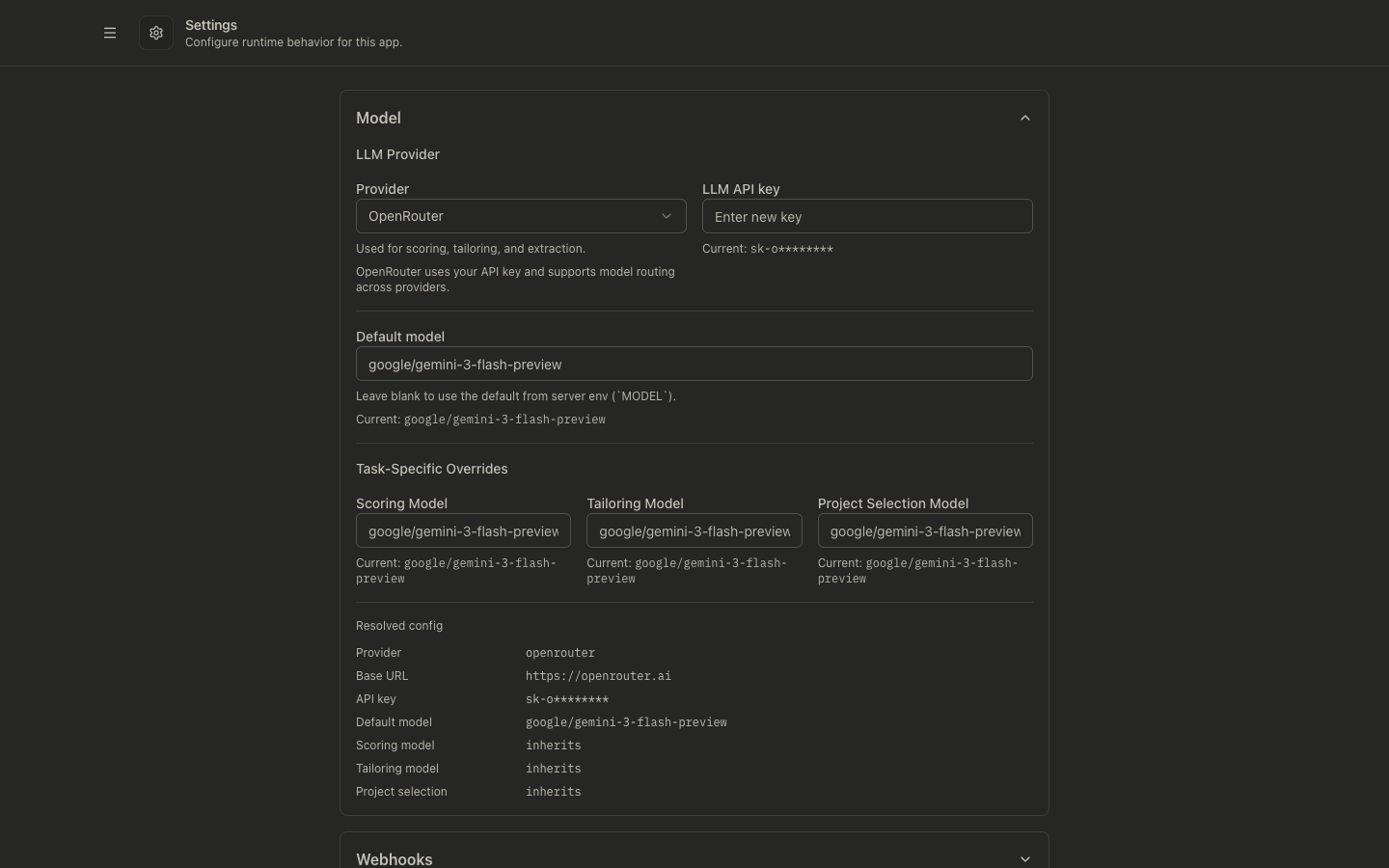
It lets you configure:
- LLM provider and models
- Webhook destinations and secret
- Display and writing-style defaults
- Editable prompt templates for core AI workflows
- Service credentials and workspace users
- Reactive Resume project selection
- Tracer Links readiness verification
- Backup and scoring rules
- Data-clearing actions in the Danger Zone
Why it exists
Most teams want stable defaults for repeated workflows, without editing environment variables every time.
Settings gives you runtime overrides for the key parts of discovery, scoring, tailoring, and post-application automation.
How to use it
- Open Settings.
- Expand each section you want to change.
- Update values and click Save Changes.
- Re-run the workflow that uses those settings (for example pipeline runs, Ghostwriter, or resume tailoring) to verify behavior.
Section-by-section guide
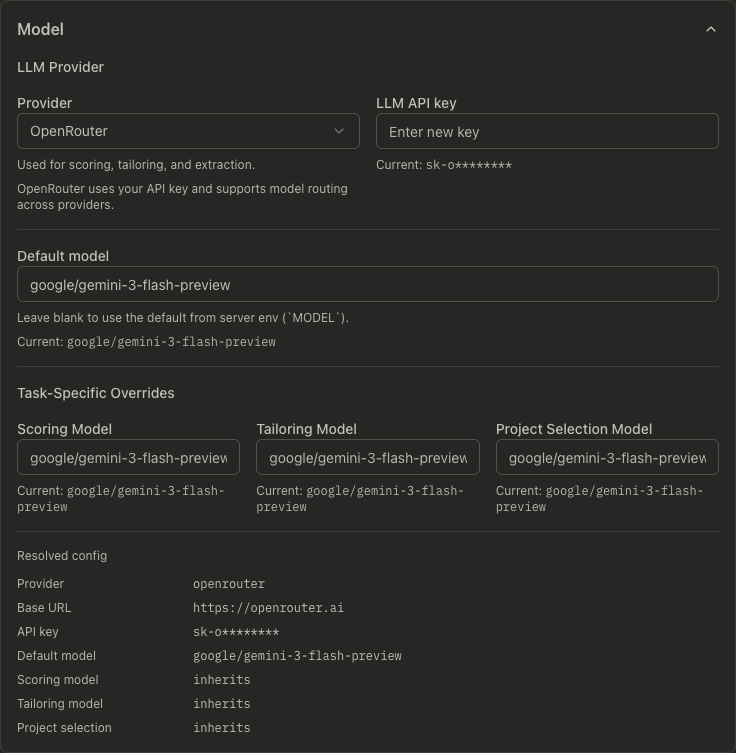
Model
- In hosted deployments with platform-managed LLM enabled, this section is hidden because provider, API key, and model selection are managed by the hosted platform.
- Choose provider (
openrouter,requesty,lmstudio,ollama,openai,glm,gemini,gemini_cli,codex) - Set provider-specific base URL/API key when required
- Configure the default model/runtime, plus purpose-specific overrides for:
- Scoring
- Tailoring
- Project selection
- Purpose overrides can inherit the default provider or use a different provider, base URL, API key, and model. For example, you can use
ollamalocally by default and route tailoring toopenaioropenrouter. - Purpose API keys are stored as secrets. The settings response shows only redacted hints.
- Provider defaults are applied automatically when the model fields are left blank:
openaidefaults togpt-5.4-minicodexdefaults togpt-5.4-miniglmdefaults toglm-5.1geminiandgemini_clidefault togoogle/gemini-3-flash-preview
- The settings page shows provider-aware model pickers for:
openai: available text-generation models onlyglm: available GLM text-generation models from the configured BigModel-compatible endpointgemini: available Gemini text-generation models onlygemini_cli: a curated list of Gemini model ids the CLI typically supports (install Gemini CLI, rungeminiand complete Google sign-in, or setGEMINI_API_KEYfor the CLI; JobOps spawns headlessgemini -p ...with--approval-mode planand no JobOps API key field). Resume import uses the CLI with extracted text: DOCX is parsed locally; PDF uses local text extraction then JSON extraction via the CLI (scanned PDFs without a text layer may not import well).ollama: locally installed Ollama models
openrouter,lmstudio, andopenai_compatiblestay manual-entry because JobOps cannot safely infer the exact model catalog from those providers- For GLM, JobOps uses
https://api.z.ai/api/paas/v4by default. Override the base URL only when using another Z.AI-compatible endpoint such as a coding-plan endpoint. - Changing the provider clears stale model overrides in the form, so inherited fields follow the new provider default unless you explicitly choose a new override
- The preview under each field and the Resolved config block reflect the model currently selected in the form, even before you save
Webhooks
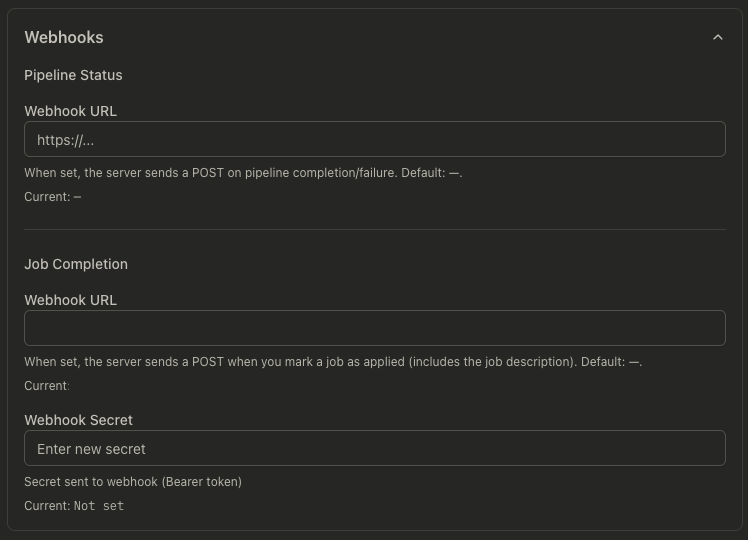
- Pipeline status webhook: called on run completion/failure
- Job completion webhook: called when a job is marked applied
- Optional webhook secret (sent as bearer token)
Display Settings
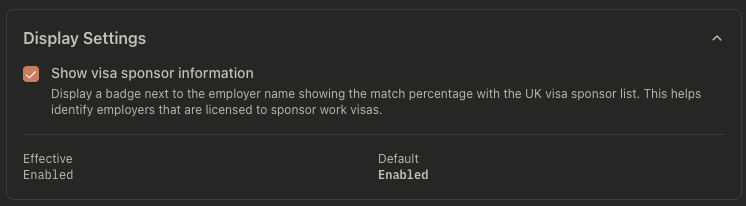
- Toggle visa sponsor badge visibility in job lists/details
- Toggle
Render Markdown in job descriptionsto control whether expanded job descriptions show formatted headings, lists, bold text, and code blocks - Default: Markdown rendering is enabled
- Toggle
Auto-tailor manually imported jobsto control whether jobs created through Manual Import immediately run tailoring + suitability scoring + PDF generation, or land in Discovered so you can tailor them later - Default: Auto-tailor on import is enabled. The per-import "Tailor automatically after import" checkbox in the Manual Import review step defaults to this setting and can override it for a single import
Writing Style & Language
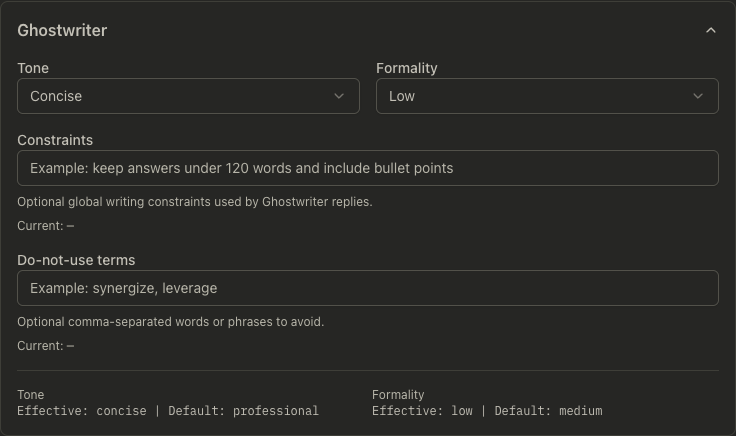
- Pick a preset for a quick starting point
- Set global writing defaults:
- Tone
- Formality
- Output language mode
- Manual output language
- Use Stop Slop for Ghostwriter
- Constraints
- Do-not-use terms
- These settings apply to Ghostwriter and resume tailoring
Use Stop Slop for Ghostwriterapplies only to Ghostwriter. It adds extra instructions that cut filler, formulaic AI phrasing, passive voice, vague claims, and em dashes.- Use the output language controls as the primary way to choose generated language
- Choose how AI output language is resolved:
Manual: always use the language you select, such as English, German, French, or SpanishMatch Resume: detect the dominant language from your resume/profile content and use that language for generated outputMatch job description: detect the dominant supported language from each job description and use it for job-specific output
- Automatic language detection currently supports English, German, French, and Spanish. If detection is unclear or the text is not in a supported language, JobOps falls back to English.
- Resume tailoring keeps the exact source wording for ATS-sensitive resume headlines and job titles, even when the rest of the tailored content is generated in the selected language
- When using the local LaTeX PDF renderer, fixed resume section titles follow the resolved output language
- Downloaded resume filenames are ASCII-transliterated using the resolved language. For German, umlauts use
ä -> ae,ö -> oe,ü -> ue, andß -> ss. - Summary max words: optional cap on AI-generated summary length (empty = no limit)
- Max keywords per skill: optional cap on keywords per skill category in tailoring (empty = no limit)
- These numeric limits override any similar constraints written in the Constraints text field
- Do-not-use terms are model guidance, not a guaranteed output filter
Use Stop Slop for Ghostwriteris disabled by default and affects only new Ghostwriter responses after you save
Writing Style & Language workflow
Use these steps when you want Ghostwriter and resume tailoring to stay in a specific language:
- Open Settings.
- Expand Writing Style & Language.
- Choose a preset if you want a starting point for tone and formality.
- Under the language control, choose one of these modes:
- Manual: pick the output language directly.
- Match Resume: let JobOps infer the language from your resume/profile text.
- Match job description: let JobOps infer the language from each job description.
- If you chose Manual, select the language you want the AI to use.
- Review the rest of the writing defaults such as tone, formality, constraints, and do-not-use terms.
- Click Save Changes.
- Run Ghostwriter or start resume tailoring again so the new language preference is applied to new output.
Defaults and constraints:
Manualis best when you always want output in one language regardless of the resume source text.Match Resumeis best when your base resume is already written in the language you want to preserve.Match job descriptionis best when you want each application to follow the job description's language.- If JobOps cannot determine a reliable supported language, it safely uses English.
- The generated resume content follows the resolved language, but ATS-sensitive headline and job-title wording stays exact so matching and parsing remain safer.
- The local LaTeX PDF renderer uses the resolved language for fixed section headings such as Summary, Experience, Education, Projects, and Technical Skills.
Prompt Templates
- Edit the base templates for:
- Ghostwriter system prompt
- Resume tailoring prompt
- Job scoring prompt
- Each editor starts from the current effective template, not a blank override
- Supported placeholders are shown inline for each template
- Use Reset to restore a single template, or Reset all prompts to restore all three
- Template editing is intentionally advanced:
- removing key instructions can degrade output quality
- removing placeholders can strip important runtime data from the prompt
- resetting restores the shared default templates
- Existing writing-style, language, and scoring-instructions settings still matter because the default templates consume those values through placeholders
Reactive Resume
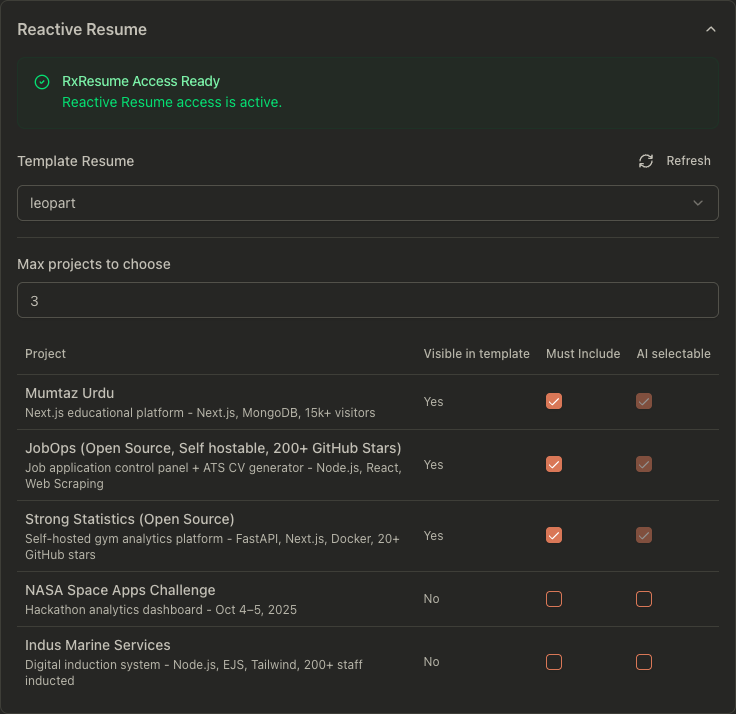
- Configure a shared RxResume URL for cloud or self-hosted deployments
- Configure a v5 API key
- Choose the PDF renderer:
- RxResume export
- Local LaTeX renderer
- Local Typst renderer
- When Typst is selected, choose a Typst theme:
- Classic
- Compact
- JobOps uses the selected RxResume resume as the source of truth for import and project data
- Invalid Reactive Resume credentials or other
4xxconfig failures block the save and stay visible as an inline error - Temporary Reactive Resume downtime shows an inline warning, but the save still succeeds
- Changing PDF-affecting settings (
pdfRenderer,typstTheme,rxresumeBaseResumeId, RxResume URL/key) auto-queues regeneration for ready jobs that currently use system-generated PDFs - Select a template/base resume
- Configure project selection behavior:
- Max projects
- Must-include projects
- AI-selectable projects
- JobOps briefly caches successful Reactive Resume resume data to reduce repeated API calls across settings, profile, and PDF flows
Tracer Links
- Verify tracer readiness before enabling per-job tracing
- Shows current status (
Ready,Unavailable,Unconfigured, or stale state) - Displays the effective public base URL and last check time
- Provides Verify now for an on-demand health check
Readiness requires:
- a valid public JobOps base URL
- successful reachability of
<public-base-url>/health - non-localhost/non-private host setup for public redirect usage
Environment & Workspaces
- Configure service accounts:
- RxResume API key
- UKVisaJobs email/password
- Adzuna app ID/app key
- Manage workspace users when signed in as a system admin:
- create a user with a private workspace
- disable a user
- reset a user's password
- Each created user gets a separate private workspace. Jobs, settings, resume data, integrations, PDFs, pipeline runs, chat, analytics, and post-application data are scoped to that user's workspace.
BASIC_AUTH_USERandBASIC_AUTH_PASSWORDare only used as legacy bootstrap credentials during migration. New sign-ins use database users.
Backup
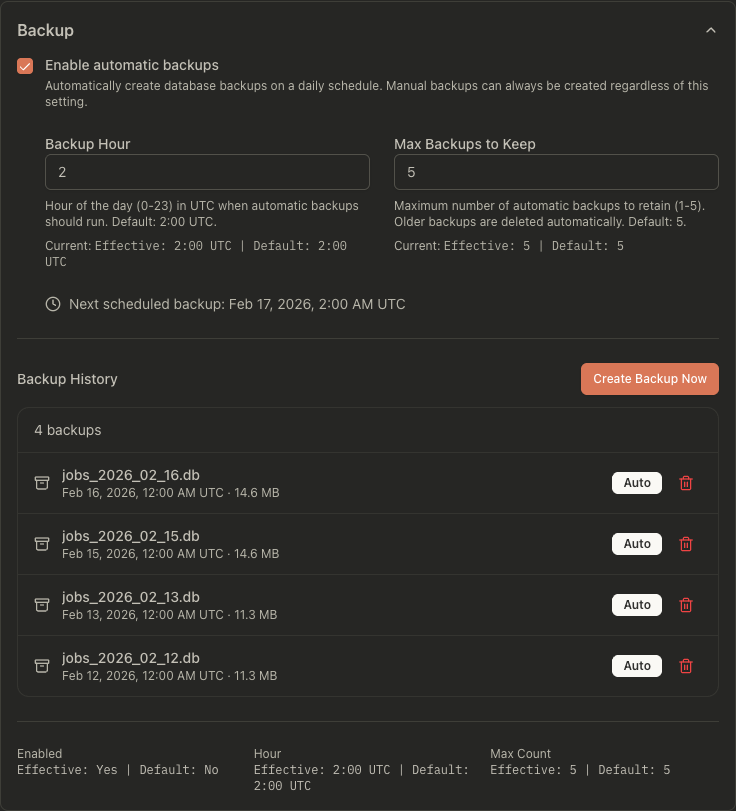
- Enable/disable automatic daily backups
- Configure backup hour (UTC) and max retained backups
- Create or delete backups manually
- Backup management is available only to system admins
- See Database Backups for full backup/restore guidance.
Scoring Settings
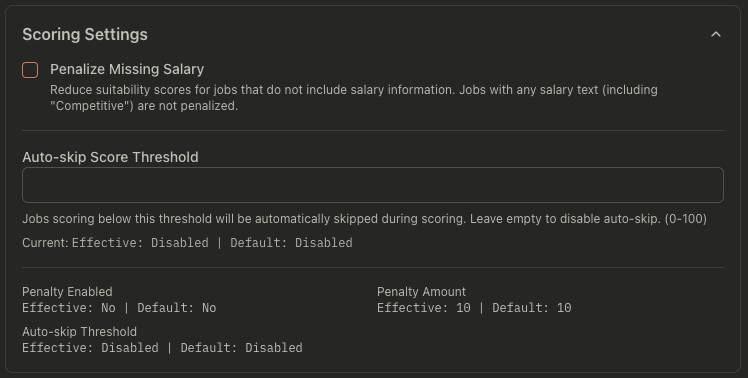
- Penalize missing salary data
- Set penalty amount
- Optional auto-skip threshold for low-score jobs
- Block jobs from companies that match configured keyword tokens
Per-search ranking preferences now live in Run search. Add them to the natural-language search brief, then review or edit them in Configure details before starting the run.
Danger Zone
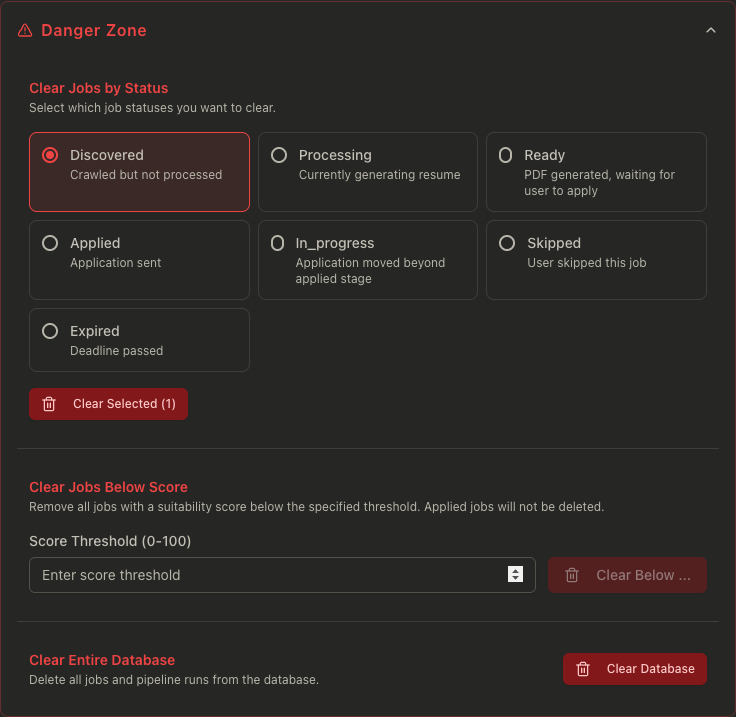
- Clear jobs by selected statuses
- Clear jobs below a score threshold
- Clear the full database
API examples
# Get effective settings (defaults + overrides)
curl "http://localhost:3001/api/settings"
# Update settings overrides
curl -X PATCH "http://localhost:3001/api/settings" \
  -H "content-type: application/json" \
  -d '{
    "llmProvider": "openrouter",
    "model": "openai/gpt-4.1-mini",
    "chatStyleTone": "concise",
    "showSponsorInfo": true
  }'
# Override the Ghostwriter base prompt template
curl -X PATCH "http://localhost:3001/api/settings" \
  -H "content-type: application/json" \
  -d '{
    "ghostwriterSystemPromptTemplate": "You are Ghostwriter. Tone: {{tone}}. Output language: {{outputLanguage}}. {{constraintsSentence}}"
  }'
# List and create backups (used by the Backup section)
curl "http://localhost:3001/api/backups"
curl -X POST "http://localhost:3001/api/backups"
Common problems
Saved value does not seem to apply
- Some settings apply only to new runs/actions after save.
- Re-run scoring/tailoring/pipeline to validate effect.
- In the Model section, the field preview and Resolved config update immediately when you choose a model, but the change only applies to future actions after you click Save.
- Prompt-template changes only affect new Ghostwriter runs, new tailoring generations, and new scoring runs after you save.
I do not see workspace user controls
- Workspace user management is shown only to system admins.
- The first user created during first-run setup or legacy migration is the system admin.
- Normal users can use their private workspace settings, but cannot create users, reset other passwords, or manage backups.
AI behavior got worse after editing a prompt template
- Open Settings → Prompt Templates.
- Reset the individual template you changed, or use Reset all prompts.
- Save settings and rerun the affected workflow.
- If you keep a custom template, make sure required placeholders still exist where you need runtime data such as
{{jobDescription}},{{profileJson}}, or{{outputLanguage}}.
Tailoring or scoring says the selected model does not exist for the current provider
- Open Settings -> Model and confirm the provider and model belong together.
- If you switch providers, leave the model fields blank to use the provider default, or pick a new provider-compatible model from the dropdown.
- JobOps ignores stale Gemini-style overrides under
openai, stale OpenAI-style overrides undergemini, and non-GLM-looking overrides underglm, but you still need to save the current form selection for future runs.
Resume tailoring used English instead of my resume language
- Open Settings → Writing Style & Language and confirm whether the language mode is set to Manual or Match Resume.
- If you want a specific language every time, switch to Manual and select that language explicitly.
- If you use Match Resume, make sure your resume/profile text has enough content in the target language for detection.
- If detection is ambiguous, JobOps falls back to English by design.
My headline or target job title did not get translated
- This is expected during resume tailoring.
- JobOps intentionally preserves exact headline and job-title wording for ATS safety, even when other tailored sections are generated in another language.
- If you need a different headline or target title, change the source resume/profile text first and then re-run tailoring.
RxResume controls are disabled
- JobOps resolves the RxResume URL in this order: the value saved in Settings → Reactive Resume, then the
RXRESUME_URLenvironment variable (if set), and finally the public cloud default. - Open Settings → Reactive Resume and configure the shared RxResume URL if you use a self-hosted instance.
- If you leave the URL blank, JobOps will fall back to
RXRESUME_URLwhen it is configured; otherwise it uses the public cloud default. - Invalid credentials block the save and remain visible inline until you edit the selected mode's credentials or URL.
- Temporary instance downtime shows a warning inline, but does not block unrelated settings updates.
- Then refresh available resumes from the Reactive Resume section.
RxResume projects look empty in the RxResume UI
- Root cause: your resume on rxresu.me has an empty Projects section.
- Fix in RxResume first: add project entries to the base resume you selected in Settings.
- Then return to JobOps, refresh/select the same base resume in Reactive Resume, and regenerate the PDF.
- JobOps preserves current visibility state, but it cannot create missing project content if the source resume has no projects.
Webhook calls fail
- Verify URL reachability from the server host.
- Confirm auth expectations on the receiver side (including secret/bearer token).
Tracer links cannot be enabled
- Open Settings → Tracer Links and click Verify now.
- Ensure
JOBOPS_PUBLIC_BASE_URLis set for background/pipeline usage. - Ensure the configured host is publicly reachable and
/healthresponds.